Claude · ChatGPT/Codex · OpenCode Go

Your AI limits. One click away.

See remaining usage and reset windows before a long task gets interrupted. Token Monitor keeps each provider visible in your macOS menu bar.

Deine AI-Limits. Einen Klick entfernt.

Sieh Nutzung und Reset-Zeiten, bevor eine lange Aufgabe ins Limit läuft. Token Monitor hält jeden Provider in deiner macOS-Menüleiste sichtbar.

Public preview v1.0.28 · macOS 14+Öffentliche Preview v1.0.28 · macOS 14+

Token Monitor
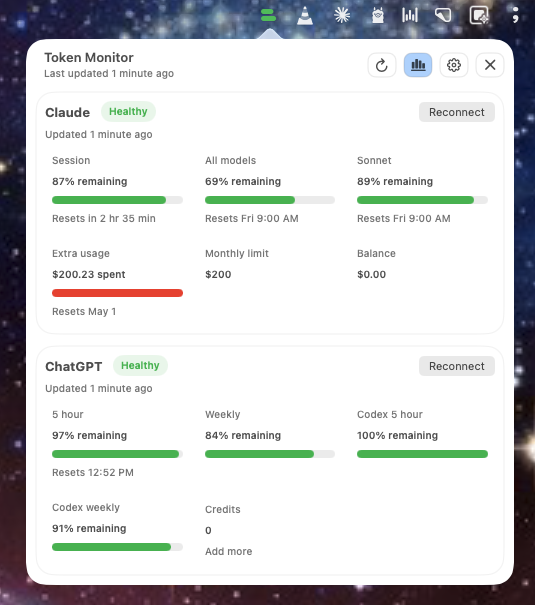
Token Monitor dashboard showing Claude and ChatGPT usage
Claude ChatGPT + Codex OpenCode Go
One menu bar viewEine Menüleisten-AnsichtInstead of multiple usage pagesStatt mehrerer Usage-Seiten
Provider-native numbersProvider-eigene WerteNo invented universal scoreKein erfundener Gesamtscore
Local macOS utilityLokale macOS-AppNo hosted Token Monitor accountKein gehostetes Token-Monitor-Konto
Less dashboard hunting
Weniger Dashboard-Suche

Know whether you have room before you start.

The useful question is not how many tokens a model has in theory. It is whether your account has enough capacity left for the work in front of you.

Wisse vor dem Start, ob noch genug Luft ist.

Entscheidend ist nicht, wie viele Tokens ein Modell theoretisch hat. Entscheidend ist, ob dein Account für die nächste Aufgabe noch genug Kapazität hat.

01

Check all providers together

Alle Provider zusammen prüfen

Claude, ChatGPT/Codex, and optional OpenCode Go stay visible without a browser-tab tour.

Claude, ChatGPT/Codex und optional OpenCode Go bleiben ohne Browser-Tab-Tour sichtbar.

02

Keep reset windows intact

Reset-Fenster richtig einordnen

Daily, weekly, session, model, and credit limits stay separate because providers do not measure usage the same way.

Daily, Weekly, Session, Modell und Credits bleiben getrennt, weil Provider Nutzung unterschiedlich messen.

03

Refresh without losing focus

Aktualisieren, ohne den Fokus zu verlieren

Refresh on launch, in the background, or on demand, then return to the work that matters.

Beim Start, im Hintergrund oder manuell aktualisieren und direkt zur eigentlichen Arbeit zurückkehren.

Real app interface
Echte App-Ansicht

The current state at a glance.

Der aktuelle Stand auf einen Blick.

Token Monitor preserves the language and limits of each provider. Green means capacity remains. Authentication and stale states stay visible instead of being hidden.

Token Monitor bewahrt die Logik und Limits jedes Providers. Grün zeigt verbleibende Kapazität. Login- und veraltete Zustände bleiben sichtbar, statt versteckt zu werden.

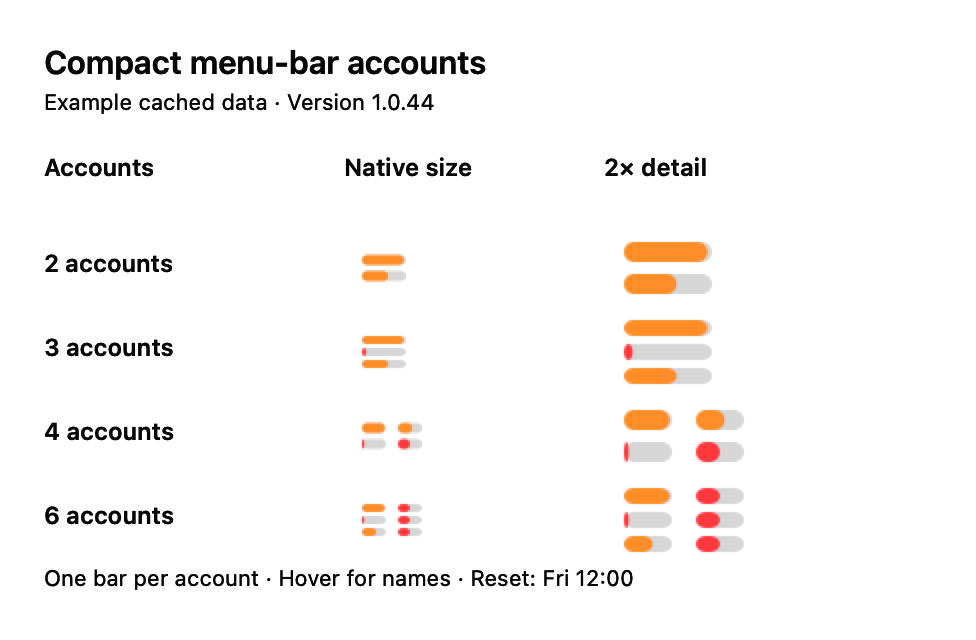
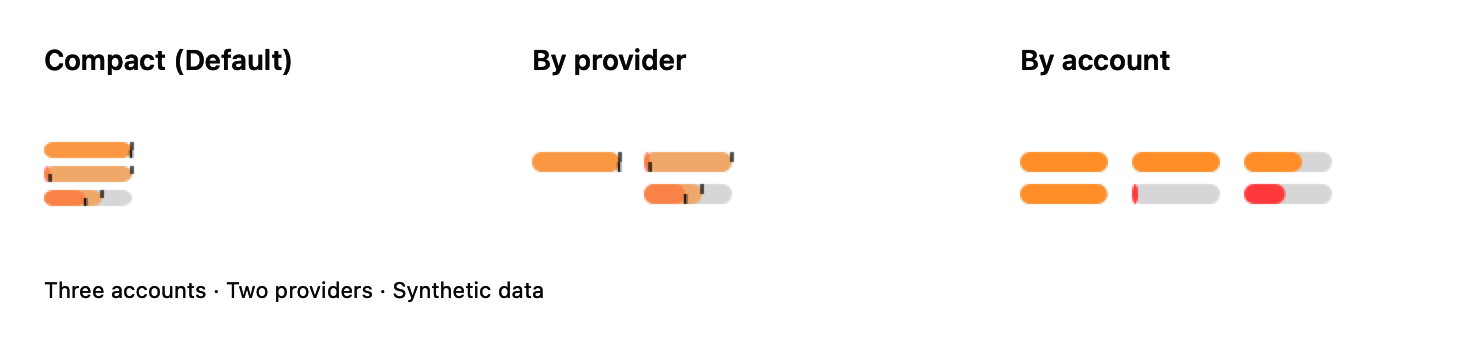
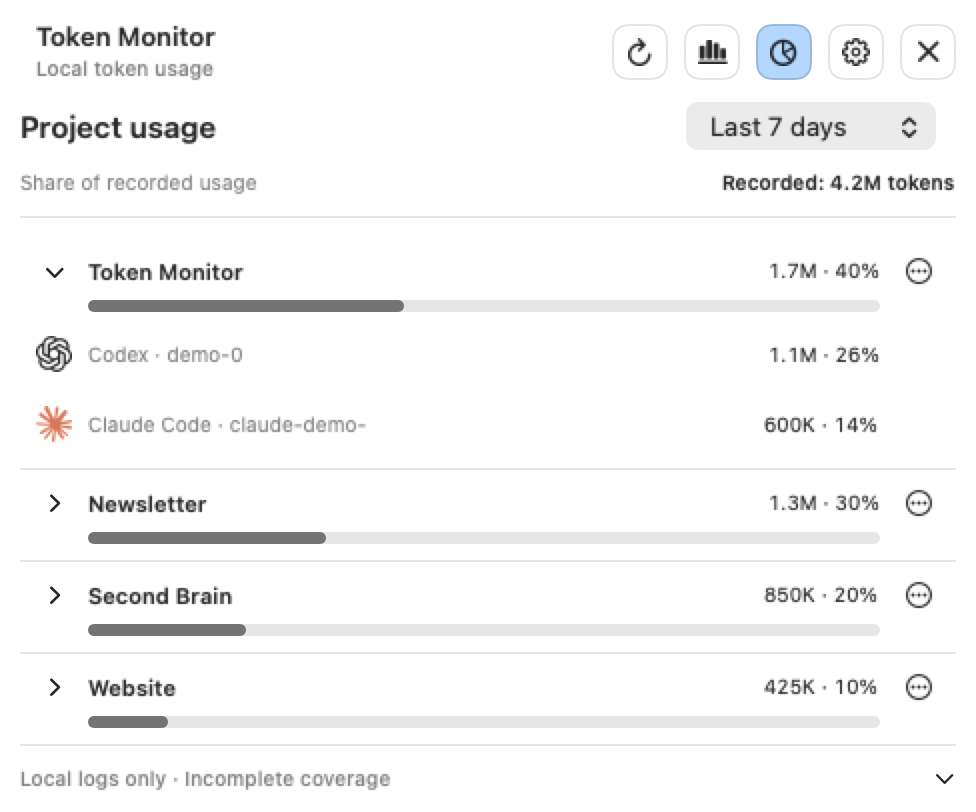
Full Token Monitor menu bar dashboard

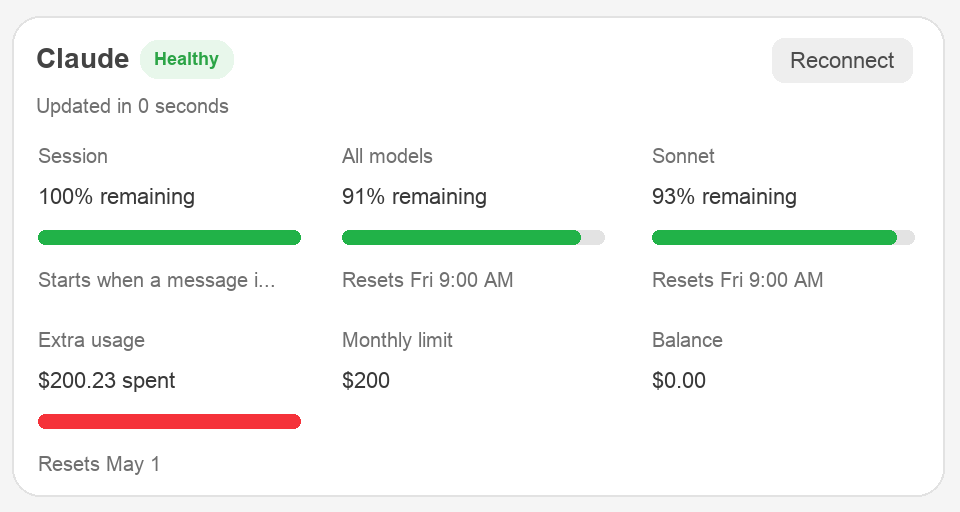
Claude

Session + modelsSession + Modelle
Claude usage details in Token Monitor

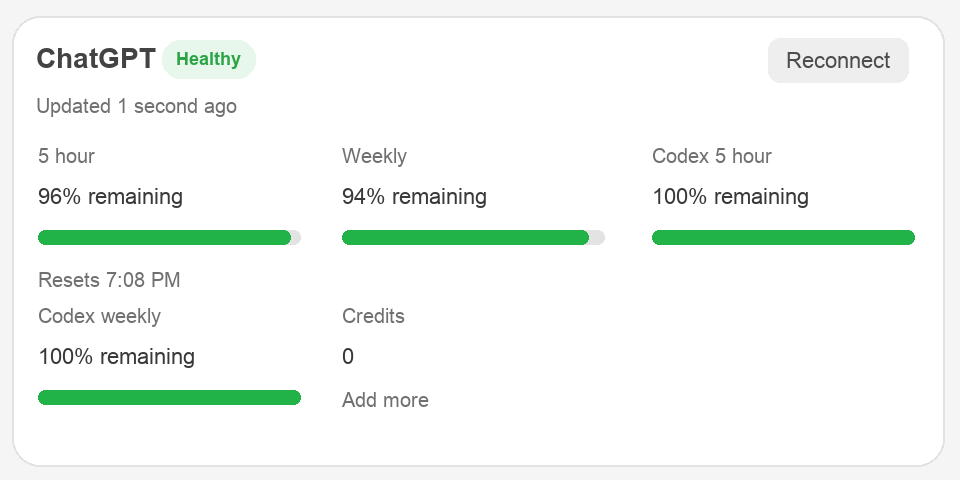
ChatGPT + Codex

Daily + weeklyDaily + Weekly
ChatGPT and Codex usage details in Token Monitor
Local-first

Your usage check stays on your Mac.

Token Monitor uses separate embedded WebKit sessions for each provider. It does not require a hosted Token Monitor account or merge your providers into a remote dashboard.

Dein Usage-Check bleibt auf deinem Mac.

Token Monitor nutzt getrennte eingebettete WebKit-Sessions für jeden Provider. Die App braucht kein gehostetes Token-Monitor-Konto und führt deine Provider nicht in einem fremden Online-Dashboard zusammen.

  • Separate login storage for every provider
  • Getrennter Login-Speicher für jeden Provider
  • Latest successful usage snapshots stored locally
  • Letzte erfolgreiche Usage-Snapshots lokal gespeichert
  • Debug mode off by default
  • Debug-Modus standardmäßig aus
  • Open source and independently inspectable
  • Open Source und unabhängig prüfbar
ClaudeIsolated WebKit sessionGetrennte WebKit-Session
Local
ChatGPT + CodexIsolated WebKit sessionGetrennte WebKit-Session
Local
OpenCode GoOptional provider connectionOptionale Provider-Verbindung
OptionalOptional
Three steps
Drei Schritte

From download to menu bar.

Vom Download in die Menüleiste.

No source build is required. Install the DMG, connect the providers you use, and check the current capacity from the menu bar.

Kein Source-Build nötig. DMG installieren, verwendete Provider verbinden und die aktuelle Kapazität in der Menüleiste prüfen.

01

Install the app

App installieren

Download the DMG, open it, and drag TokenMonitor.app into Applications.

DMG laden, öffnen und TokenMonitor.app in Applications ziehen.

02

Connect providers

Provider verbinden

Sign in to Claude and ChatGPT inside their separate app windows. OpenCode Go remains optional.

Claude und ChatGPT in ihren getrennten App-Fenstern anmelden. OpenCode Go bleibt optional.

03

Check capacity

Kapazität prüfen

Open the menu bar popover whenever you need the latest provider-specific state.

Das Menüleisten-Popover öffnen, wenn du den aktuellen Provider-Status brauchst.

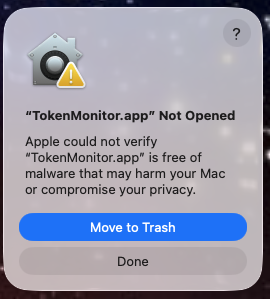
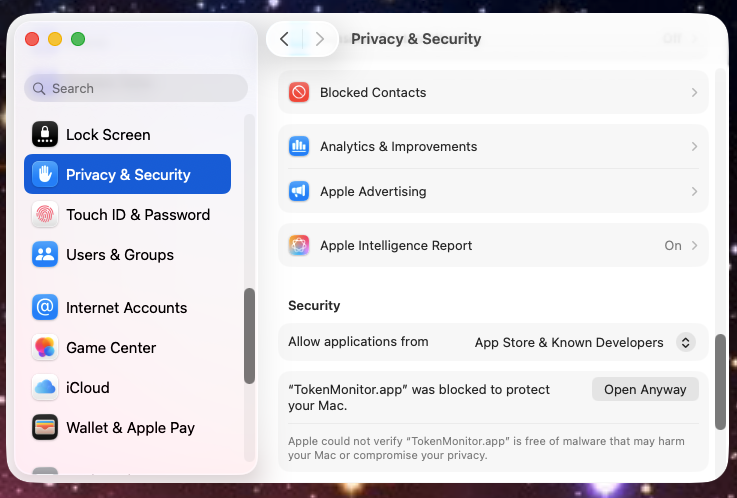
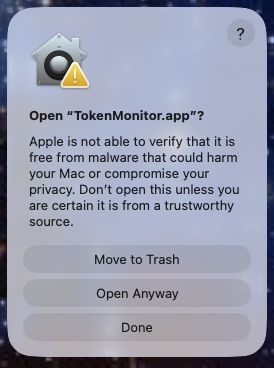
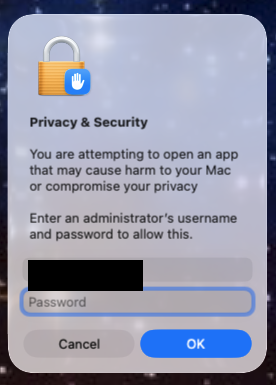
Gatekeeper preview noteGatekeeper-Hinweis

This preview can show Apple's verification warning until the app is Developer ID signed and notarized. Download only from this repository and follow Apple's official “Open Anyway” instructions.

Diese Preview kann Apples Prüfwarnung zeigen, bis die App mit Developer ID signiert und notarisiert ist. Lade sie nur aus diesem Repository und folge Apples offizieller Anleitung „Dennoch öffnen“.

Show the Gatekeeper stepsGatekeeper-Schritte anzeigen
FAQ

Good to know before installing.

Gut zu wissen vor der Installation.

Do I need Claude, ChatGPT, and OpenCode Go?Brauche ich Claude, ChatGPT und OpenCode Go?

No. Connect Claude, ChatGPT, or both. OpenCode Go monitoring is optional and off by default.

Nein. Verbinde Claude, ChatGPT oder beide. OpenCode Go ist optional und standardmäßig ausgeschaltet.

Does Token Monitor reuse browser cookies?Verwendet Token Monitor meine Browser-Cookies?

No. Every provider uses its own persistent WebKit session inside the app.

Nein. Jeder Provider nutzt eine eigene persistente WebKit-Session in der App.

Can I switch provider accounts?Kann ich den Provider-Account wechseln?

Yes. Open provider options in Settings to reconnect, switch accounts, or disconnect. Switching clears only the selected provider session and asks Google to show the account chooser when Google sign-in is used.

Ja. Öffne die Provider-Optionen in den Settings, um neu zu verbinden, den Account zu wechseln oder die Verbindung zu trennen. Beim Wechsel wird nur die ausgewählte Provider-Sitzung gelöscht. Bei Google Sign-in erscheint anschließend die Account-Auswahl.

How does Token Monitor update?Wie wird Token Monitor aktualisiert?

Manual checks are available in Settings. From version 1.0.22, automatic update checks are off by default and can be enabled there.

Manuelle Prüfungen sind in den Settings verfügbar. Ab Version 1.0.22 sind automatische Update-Prüfungen standardmäßig aus und können dort aktiviert werden.

Is this an official Anthropic or OpenAI app?Ist das eine offizielle App von Anthropic oder OpenAI?

No. Token Monitor is an independent open-source utility and is not affiliated with Anthropic, OpenAI, or Apple.

Nein. Token Monitor ist ein unabhängiges Open-Source-Werkzeug und nicht mit Anthropic, OpenAI oder Apple verbunden.

Why is Token Monitor missing from Login Items?Warum fehlt Token Monitor bei den Anmeldeobjekten?

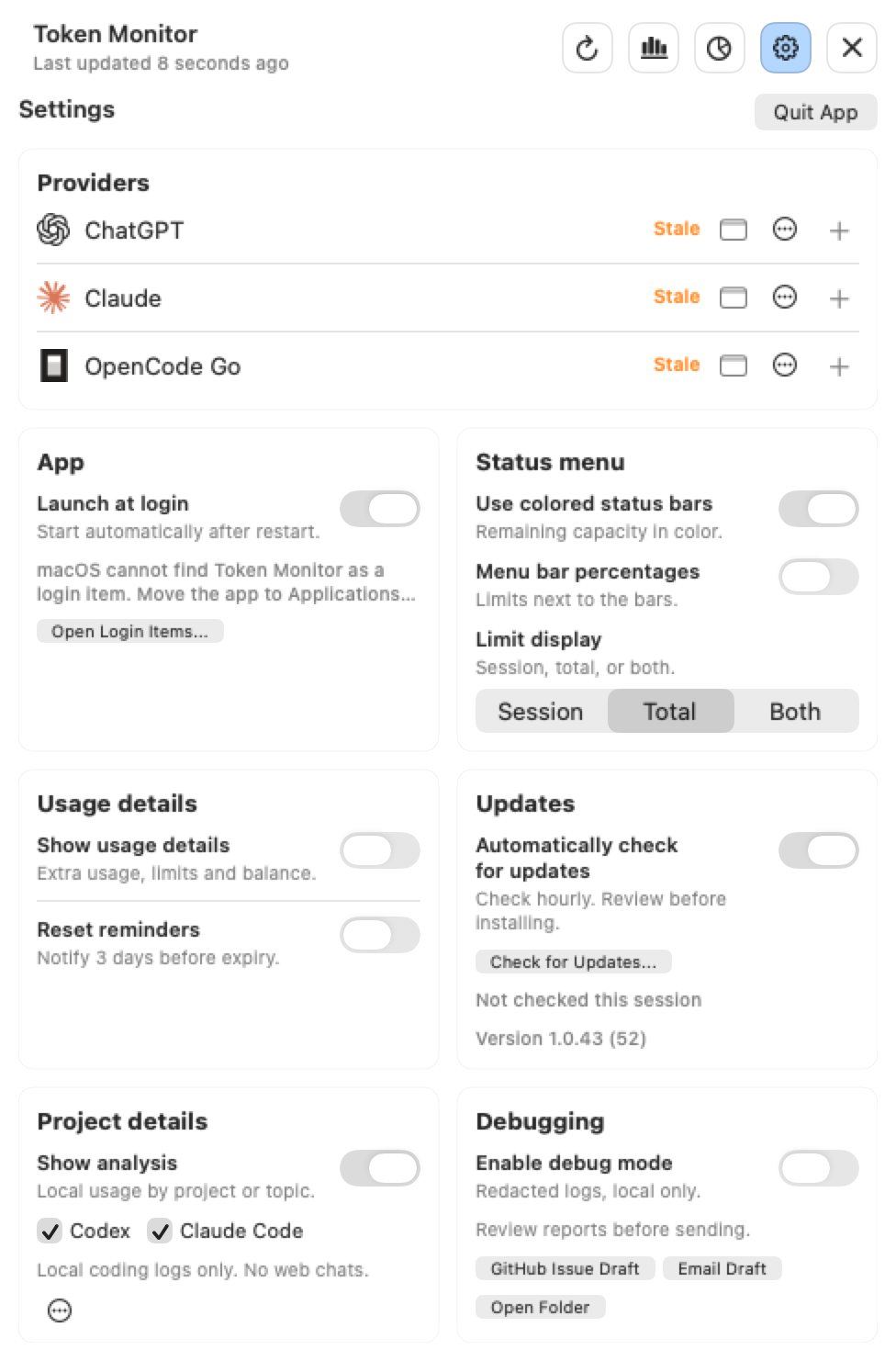
Launch at login uses Apple's ServiceManagement API, which expects a code-signed app. Move TokenMonitor.app to Applications, open it once, and enable Launch at login in Settings.

Launch at login nutzt Apples ServiceManagement-API, die eine signierte App erwartet. Verschiebe TokenMonitor.app nach Applications, öffne sie einmal und aktiviere Launch at login in den Settings.
Start the next task with the limit in view.

Starte die nächste Aufgabe mit dem Limit im Blick.

Download the current public preview for macOS or inspect the complete source code on GitHub.

Lade die aktuelle öffentliche Preview für macOS oder prüfe den vollständigen Source Code auf GitHub.